
Phone Overheating While Gaming? 12 Fixes That Actually Work
Phone overheating while gaming? 12 practical fixes for settings, charging, cases and cooling that keep frame rates stable in long MLBB or PUBG sessions.
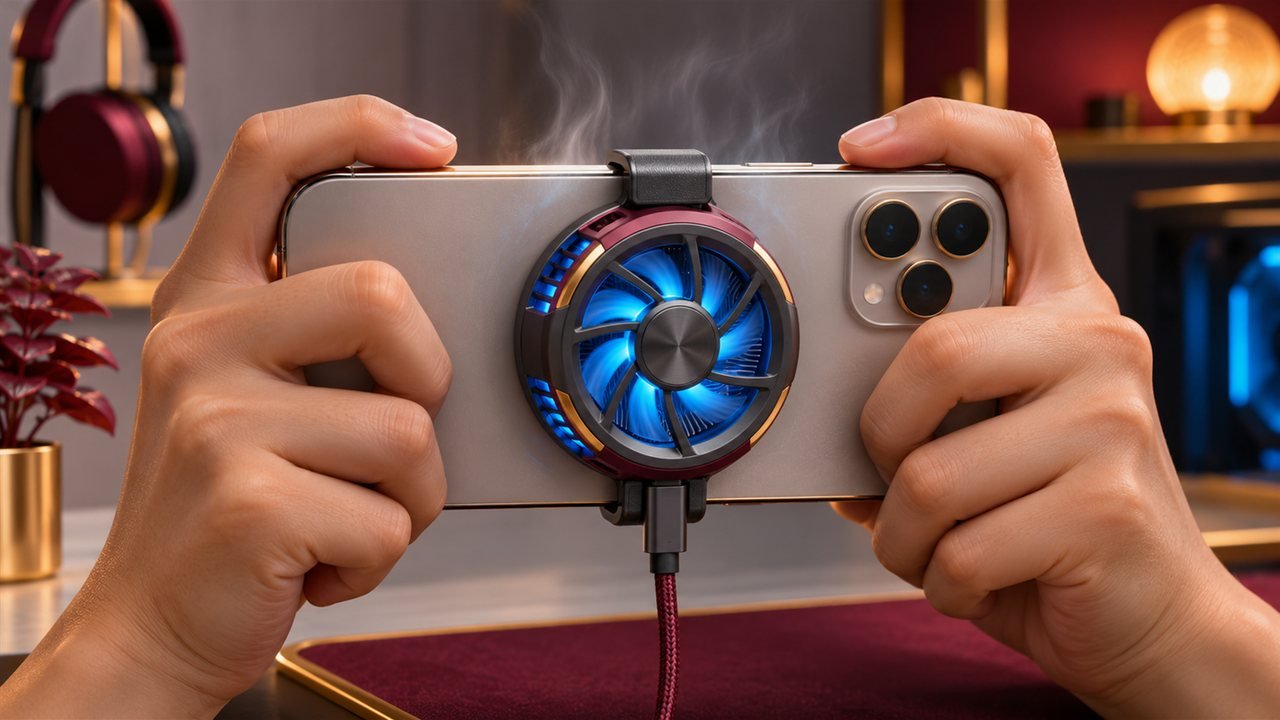
If your phone gets hot after three Mobile Legends matches and the frame rate starts to drop, you are not alone. Heat is one of the top concerns for mobile gamers, which is why 2026 gaming-phone lists in Indonesia now highlight vapor chambers, built-in fans and huge batteries. This guide covers phone overheating while gaming: why it happens, 12 fixes that actually help, and when heat is a warning sign.
Why your phone overheats while gaming
A phone has no big fan or open vents. Everything the chip does turns partly into heat, and that heat has to escape through the glass and frame. When the phone gets too hot, it protects itself.
Apple's support page describes what happens on an iPhone when it gets too hot: performance may be limited, charging may slow or stop, the display may dim, and some apps may run at lower frame rates. Android phones do something similar. In games, this is called thermal throttling: the chip slows down, and your smooth 90 or 120fps turns into stutter.
Common heat sources, according to Apple and Samsung support pages:
- Graphics-intensive games.
- Charging, especially at the same time as heavy use.
- Direct sunlight and hot environments.
- Weak cellular signal, mobile hotspot and roaming.
- Max screen brightness.
- Apps running in the background.
12 fixes for phone overheating while gaming
1. Don't charge while you play
Charging produces heat on its own. Gaming on top of charging doubles the load. Samsung's advice when a phone gets hot during charging is to unplug, close running apps and let it cool completely before charging again. Charge before your session, not during it.
2. Take the case off for long sessions
A thick case, especially leather or rugged cases, traps heat against the back of the phone. For long ranked sessions, remove it, or switch to a thin case.
3. Lower the graphics and frame-rate settings
This is the biggest single fix. Ultra graphics and the highest frame-rate mode push the chip to the limit. Try:
- One step lower graphics quality.
- A frame rate that your phone can hold steadily. A steady lower frame rate feels better than a high one that drops every few minutes.
- Turning off extras like anti-aliasing or shadows if the game allows.
4. Turn screen brightness down
Samsung's guide lists maximum brightness as a heat source. Lower it a few steps, especially indoors.
5. Turn off what you don't use
Samsung recommends switching off Wi-Fi, GPS and Bluetooth when not in use, because they use power and add heat. If you play on Wi-Fi, turn off mobile data, and vice versa. Don't run a hotspot while gaming.
6. Play where the signal is strong
Weak cellular signal makes the modem work harder. Samsung lists weak reception as a heat source. If you can, play on stable Wi-Fi, or move closer to a window.
7. Close background apps
Social media, video and shopping apps running in the background add load. On Samsung phones, the support page points to Settings > Device care to see battery-hungry background activity. Other brands have similar battery or "phone manager" menus.
8. Use your game mode wisely
Most Android gaming phones include a game mode or game booster. A "performance" or "high performance" profile keeps the chip running hot. If heat is the problem, try a balanced profile; you often lose very little frame rate but gain much more stability. Menu names differ by brand, so explore yours.
9. Keep the phone out of the sun and hot cars
Apple says iPhones are designed for ambient temperatures between 0 and 35 °C, and warns against leaving devices in parked cars. In much of Indonesia, a room without air conditioning or an outdoor spot in the afternoon can get close to that upper limit. Play in the shade, near a fan or in a cooler room.
10. Update your phone and games
Samsung notes that software updates include thermal management improvements. Update the system and the game; new game versions often fix performance issues too.
11. Use genuine chargers and cables
Samsung warns against uncertified third-party chargers and says to replace damaged cables with genuine accessories. A bad charger can heat the phone even before you start playing.
12. Try a clip-on phone cooler
Clip-on cooling fans that attach to the back of the phone are popular with mobile gamers. They can help in long sessions, especially in hot rooms. Buy from a store with clear reviews and warranty, and follow the maker's instructions on power and use.
Quick pre-match checklist
Before a long session, run through this in one minute:
- Battery above 60% and charger unplugged.
- Case off.
- Brightness down a few steps.
- Background apps closed.
- Unused radios (GPS, Bluetooth, hotspot) off.
- Game set to a frame rate your phone can hold.
- Phone in a cool spot, not in the sun or on a blanket.
When heat is a warning sign
Normal gaming warmth is fine. Stop and investigate if:
- The phone shows a temperature warning. Apple recommends turning the device off, moving it somewhere cooler and letting it cool before using it again.
- The phone gets very hot when you are not using it.
- The battery is swollen, the screen lifts or the back bulges. Stop using it and take it to an authorized service center.
- It overheats only with one charger or cable. Replace that accessory.
If you are buying a new phone
If heat is constantly ruining your sessions, look at cooling when you buy your next phone. Indonesian 2026 gaming-phone lists from VIVA highlight vapor chambers, a few phones with built-in physical fans, and batteries up to 7,300mAh. My guide to the best gaming phones under 4 million rupiah compares popular options, and tips for buying electronics online helps you avoid fake listings.
Mistakes that make heat worse
- Gaming while fast charging, on a bed or pillow.
- Using the maximum graphics preset "because the phone can".
- Putting the phone in the fridge or freezer to cool it quickly (sudden cold can cause condensation inside).
- Ignoring a swollen battery.
- Installing "phone cooler" apps that promise to lower temperature; they cannot cool hardware.
Key takeaways
- Phone overheating while gaming triggers thermal throttling, which lowers frame rates.
- The biggest fixes: don't charge while playing, remove thick cases and lower graphics settings.
- Apple and Samsung both list sunlight, charging, brightness, weak signal and heavy games as heat sources.
- Use a balanced game mode and keep the phone updated.
- Stop using the phone if you see a temperature warning or a swollen battery.
FAQ
Is it normal for my phone to get hot while gaming?
Some warmth is normal, especially in heavy games. It becomes a problem when frame rates drop, the phone shows a warning, or it gets hot while idle.
Can overheating damage my phone?
Phones protect themselves by slowing down or stopping charging, but repeated high heat is not good for the battery over time. Follow the fixes above and stop if you see a warning.
Do phone cooling fans really work?
Clip-on fans can help during long sessions in hot rooms. They are an extra, not a replacement for good settings.
Sources
Read next
 NEW
One UI 9.5 Beta: Galaxy S26 Changes and How to Join
One UI 9.5 beta is live for Galaxy S26 in six countries. Every confirmed change in camera, privacy, DeX and storage, how to join, and what Indonesia can expect.
Read more
 NEW
Gemini Intelligence on Pixel 10: Rambler, Widgets and Tasks
Gemini Intelligence on Pixel 10 brings Rambler voice typing, app automations and Create My Widget. What each feature does and where it works.
Read more
 NEW
Siri App Intents in iOS 27.3 Beta: Siri Can Use Any App
Siri App Intents in the iOS 27.3 beta let any developer plug their app into Siri AI. What it means for iPhone users, what to try now and how to prepare.
Read more